For grandMA3 Professionals - Phone & Tablet

Your grandMA3 Remote
On Phone and Tablet

iFocus Remote turns any Android phone or tablet into a complete programming remote for grandMA3 consoles and onPC. The same hardware-style interface on both devices, in portrait and in landscape: select groups, set every attribute, recall presets, run sequences and executors, all over OSC on your local network.

15 Control Tabs
26 Attribute Encoders
99 Executor Pages
30 896 Fixture Modes
5 Languages
iFocus Remote on a tablet - POSI tab
iFocus Remote on a phone - POSI tab
Complete Control

Every Parameter
At Your Fingertips

iFocus Remote sends real command-line commands to the console, exactly what you would type on it, and reads back the names and colors of your groups, presets, sequences and executors. Everything below is included in the single license.

26 Attribute Encoders

Dimmer, Pan, Tilt, Focus, Zoom, Red, Green, Blue, White, CTO, CTC, CTB, Iris, Gobo 1, Gobo 2, Prism, Frost, eight shaper blades and the shaper rotation. The main encoders are dual-concentric, like on a hardware controller: the center knob is COARSE, the outer ring is FINE.

  • COARSE: 2 % per 15 degrees - FINE: 0.5 %
  • LED ring and blue display follow every value
  • Short haptic pulse (30 ms) on every key press
  • Values sent as console commands, e.g. Attribute "dimmer" At 50

Phone and Tablet

One app, one license, the same functions everywhere. The interface scales to the screen and rearranges itself in portrait and in landscape, on a 6-inch phone as well as on a 10-inch tablet.

Executors on 99 Pages

Each page gives 15 faders (201-215), 30 knobs (301-315, 401-415) and 30 keys (101-115, 201-215). Names, levels, appearance colors and key types are read from the console, and the faders follow the console when it moves them.

Groups and Sequences

Your group pool and your sequence pool, with their numbers, names and the appearance colors set on the console. Tap several groups to add them to the selection; tap a sequence to send Go+, tap again to send Off.

Presets From Six Pools

Dimmer, Position, Color, Beam, Focus and Shapers presets are read from the console. Every pad shows and recalls the real pool number of the preset, so empty slots in a pool never shift anything.

Command Keypad With MA Key

Compose a command line as on the console (Fixture, Group, Preset, Thru, At, If, Store, Update...) and send it with PLEASE. The MA key unlocks second functions: Lowlight, Next Step, Record, Cook, Extract and more.

Patch Viewer and QR Sharing

Download the patch of the show over OSC: FID, name, mode and DMX address of every fixture. Share it with a QR code: any device on the network opens it in a browser, also as PDF, text or JSON.

Fixture Finder, Offline

An embedded database of 30,896 fixture modes from the grandMA3 library. Build the DMX channel order of an unknown fixture and find the matching fixture and mode, without any network.

DIP Switch Calculator

DMX address 1 to 512 to nine DIP switches, and back. Turn the knob, type the address or flip the switches; the calculation is shown in full.

Gamepad Support

Plug in a Bluetooth or USB gamepad and move Pan/Tilt with a stick. 16 assignable controls, adjustable dead zone, precision curve and maximum speed, Fine and Speed modes.

5 Languages, Full Guide

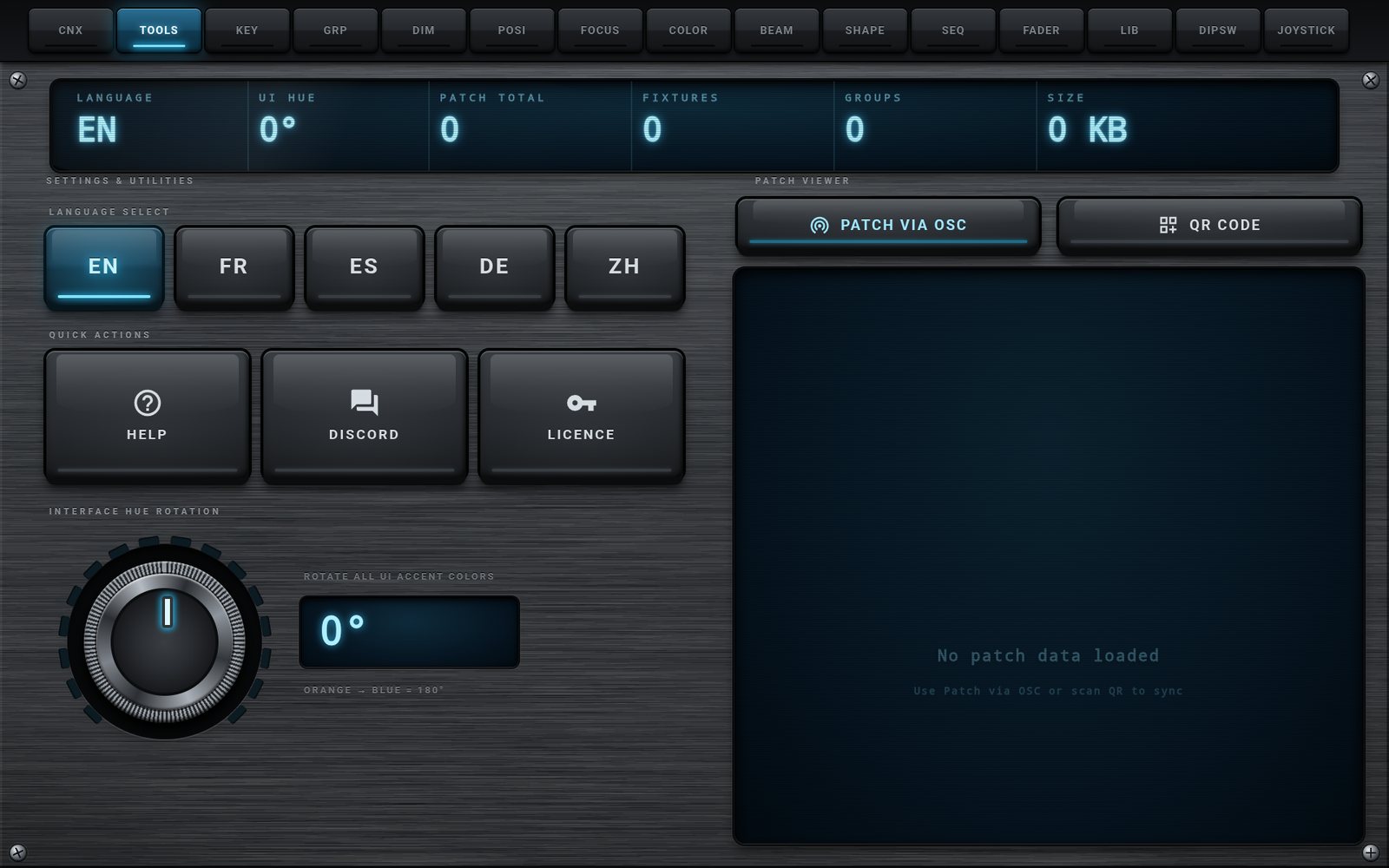
English, French, Spanish, German and Chinese. A complete 24-chapter guide is built into the app and available online, with the console setup explained step by step.

Made for the Road

Once activated, the app runs without Internet on an isolated stage network. The lists from the last synchronization stay visible offline, and the console IP, sync settings, language and gamepad mapping are remembered.

Phone & Tablet

One Interface,
Every Screen

iFocus Remote is the same application on a phone and on a tablet. Nothing is removed on the small screen: the panels are scaled and rearranged so that every key stays under your thumbs. All the screenshots on this page are shown twice, taken on a real phone and on a real tablet, so you can compare them side by side.

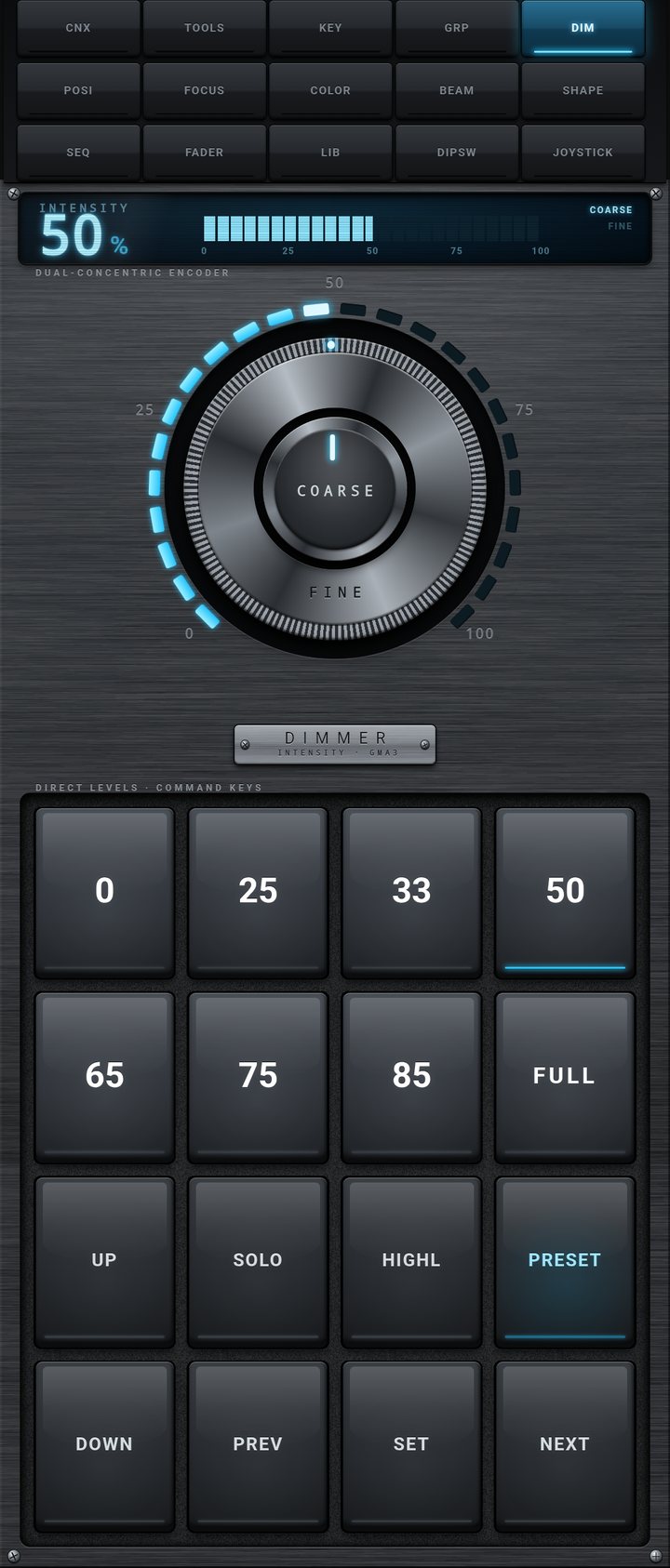
DIM tab on a phone, portrait
Phone
DIM tab on a tablet, landscape
Tablet
Tablet, landscape Tablet, portrait Phone
Tab bar one row of 15 two rows (8 + 7) portrait: three rows of 5 - landscape: one row
GRP / SEQ pads 8 columns, 32 pads per page 5 columns portrait: 4 columns - landscape: as many as the width allows
FADER 15 strips side by side two rows (201-208, 209-215) portrait: two rows, long faders - landscape: 15 strips
Encoders and keys encoders left, key grid right display on top, encoder in the middle, keys at the bottom same as the tablet, scaled to the screen
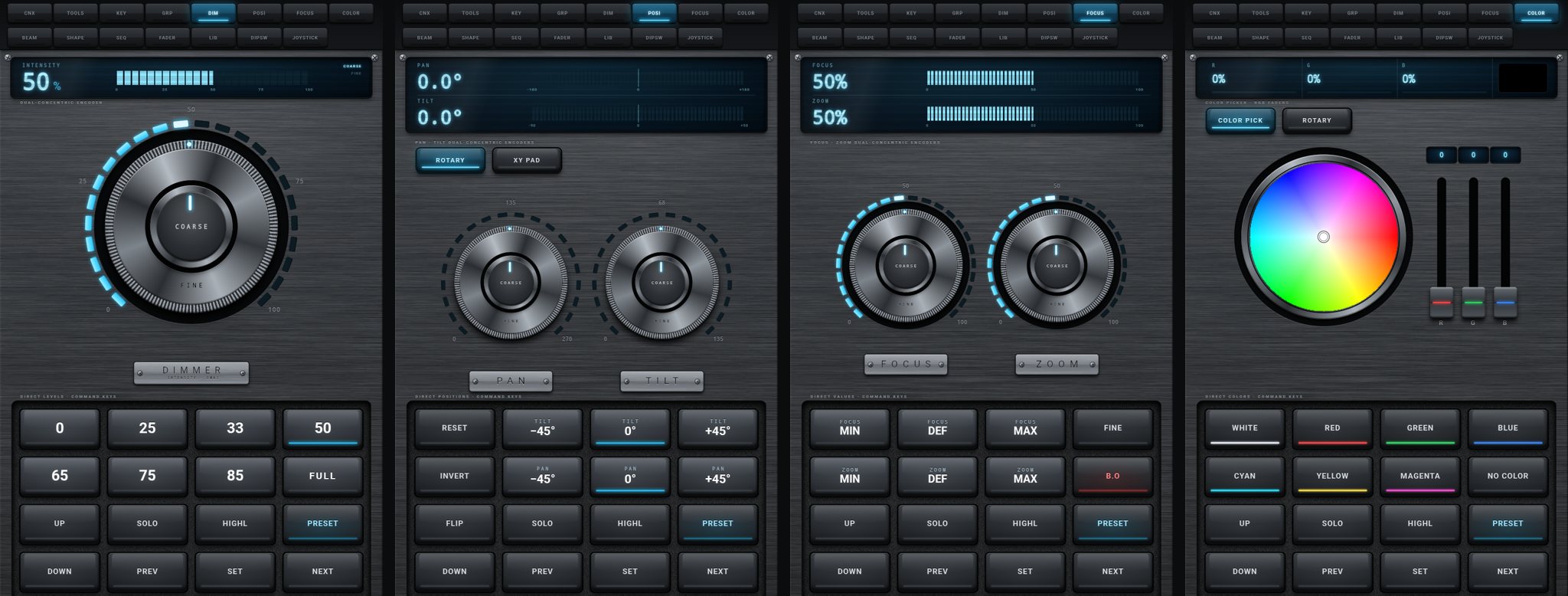
DIM, POSI, FOCUS and COLOR tabs on a tablet in portrait

Tablet in portrait: DIM, POSI, FOCUS and COLOR. The display on top, the main control in the middle, the keys at the bottom under your thumbs.

Connection & Settings

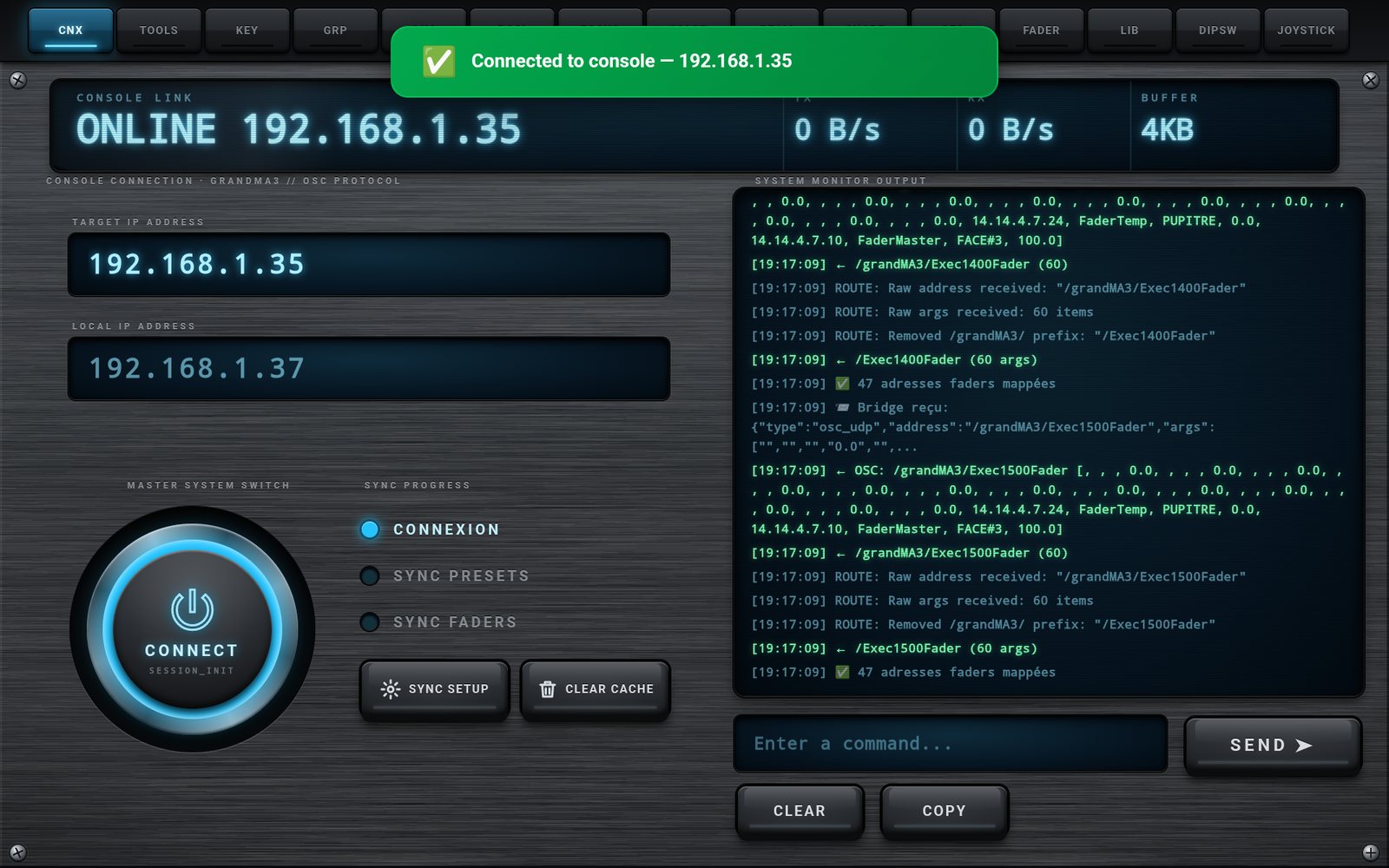
Connected in Eight Seconds

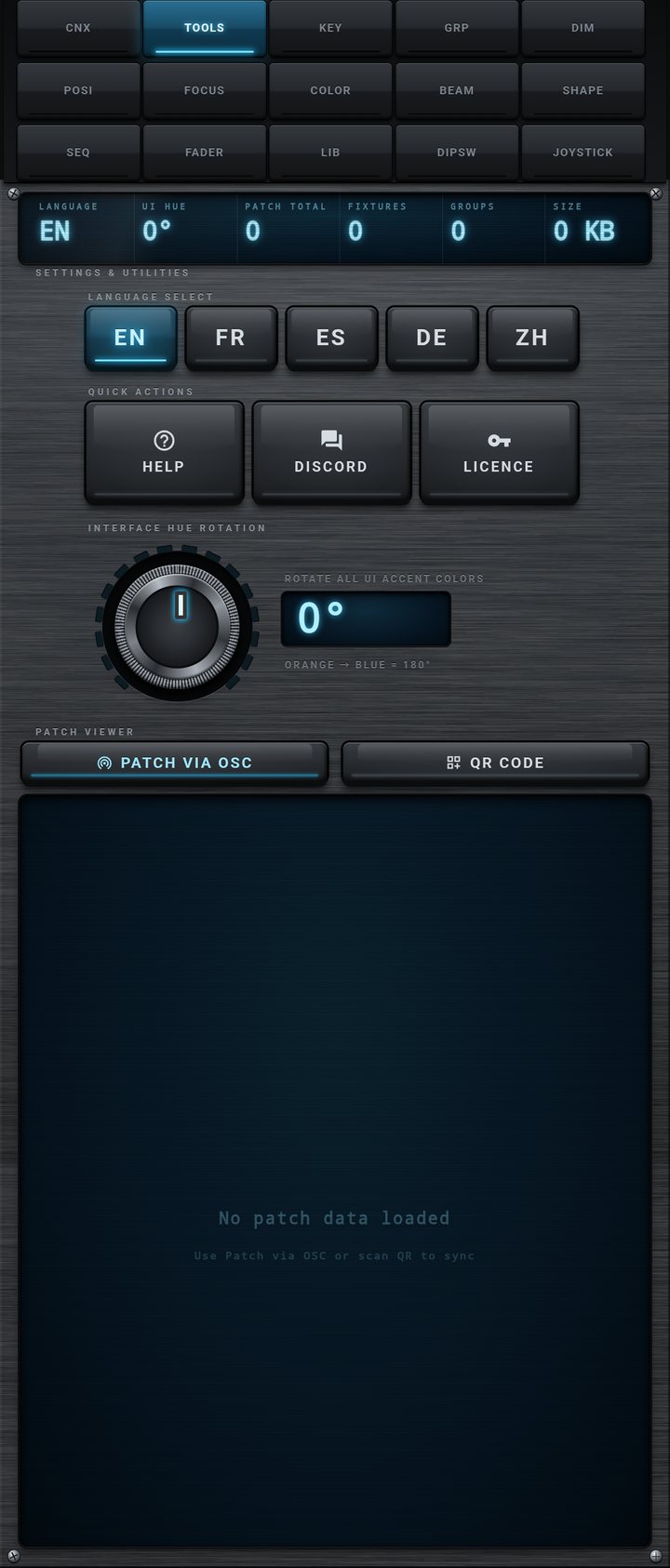
Type the IP address of the console, press CONNECT, and the app reads your show: executors, groups, sequences, presets, names and colors. A dark, high-contrast interface designed for the stage, whose hue you can rotate to your taste.

15 Specialized Tabs

One App, Complete Control

CNX, TOOLS, KEY, GRP, DIM, POSI, FOCUS, COLOR, BEAM, SHAPE, SEQ, FADER, LIB, DIPSW and JOYSTICK. Select your fixtures in GRP or KEY, then set them in DIM, POSI, FOCUS, COLOR, BEAM and SHAPE: these tabs act on the current selection of the console. Every tab is shown on the phone and on the tablet; click a picture to enlarge it.

Keys shared by the attribute tabs

  • SOLO, HIGHL, B.O: toggles shared by the whole app, sending Solo On/Off, Highlight On/Off, Blackout On/Off
  • UP, DOWN, PREV, SET, NEXT: sent immediately, to step through the selection fixture by fixture
  • PRESET: replaces the encoders with the preset pads of the matching pool, 16 per page, and sends At Preset pool.N
  • COARSE / FINE: on every encoder, by touching the center or the ring, or with the dedicated key
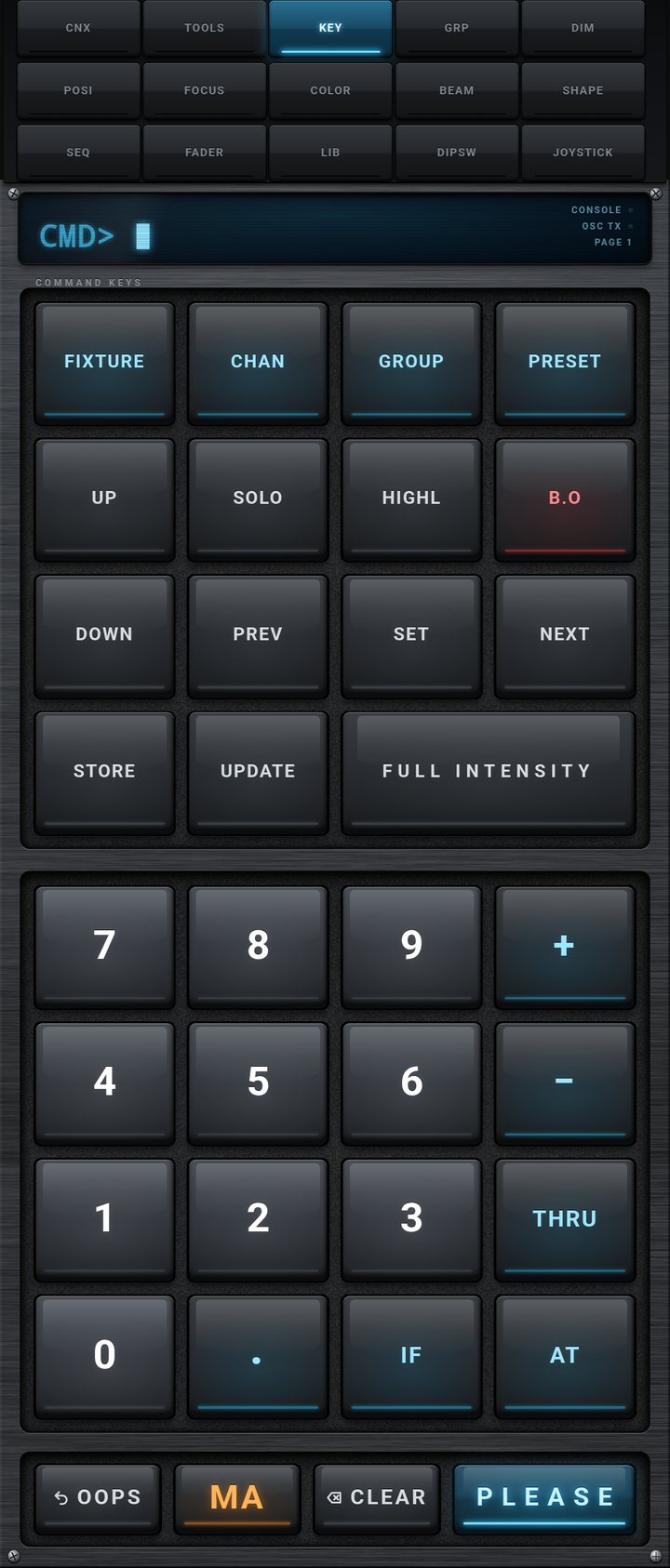
KEY tab on a phone
Phone
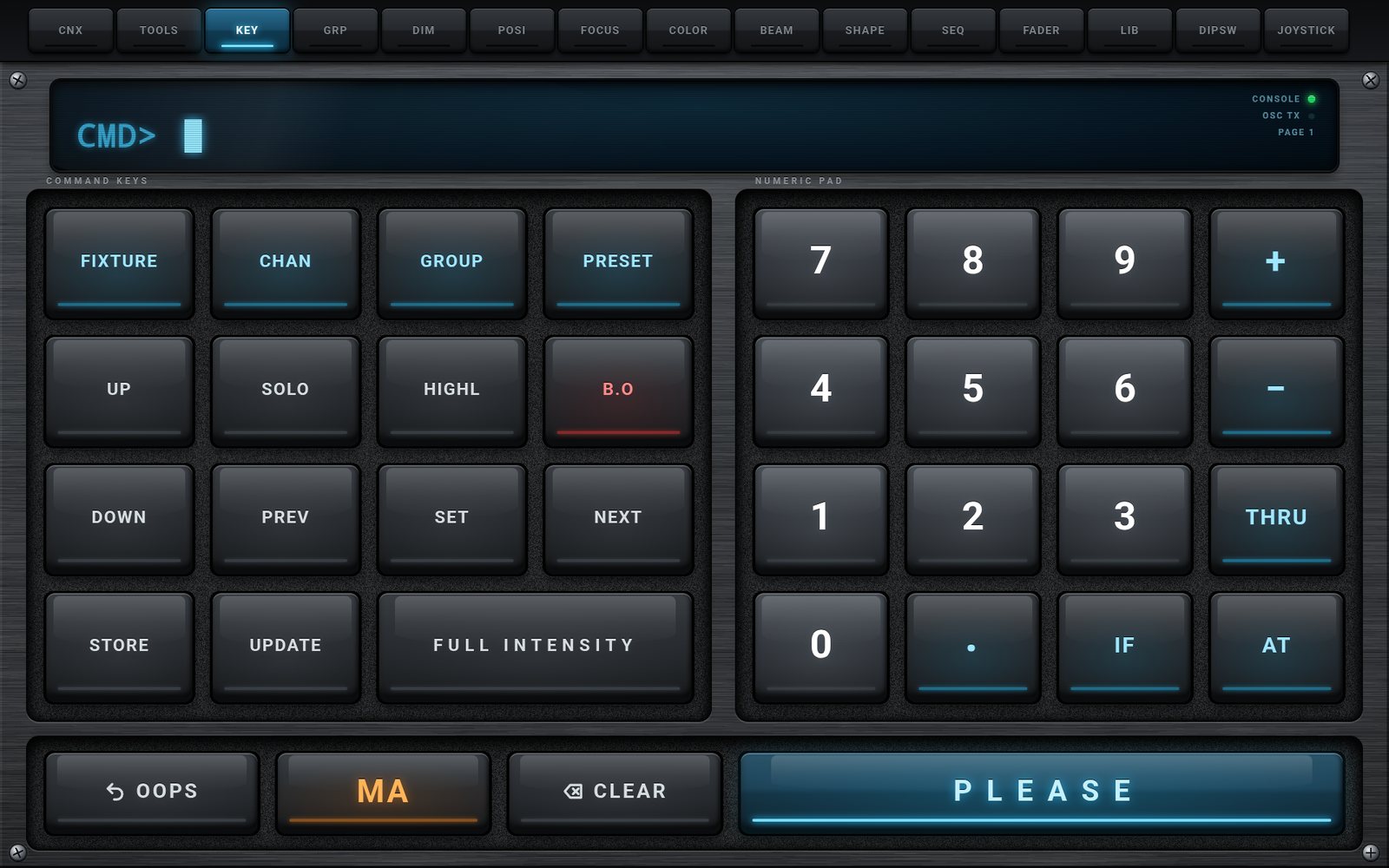
KEY tab on a tablet
Tablet
KEY

Command Keypad & Command Line

The CMD> display shows the command you are composing; nothing is sent until you press PLEASE. Composition keys add a word (Fixture, Channel, Group, Preset, Store, Update, Full, Thru, At, If, +, -, digits), action keys are sent at once (Up, Down, Prev, Set, Next, Solo, Highlight, Blackout). After sending, LAST shows the command and SENT, or OFFLINE if the app was not connected.

  • PLEASE sends the line, OOPS removes the last word, CLEAR sends ClearAll
  • MA key, held or one-shot, with orange legends for the second functions
  • MA + key: FixtureType / FixtureLayer / FixtureClass, Tag, FeatureGroup / DataPool, Lowlight, Previous Step, Step Toggle, Next Step, Record, Offset / Cook, Hold, Default, Integrate / Extract
  • Example: GROUP 1 + GROUP 4 FULL INTENSITY PLEASE sends Group 1 + Group 4 Full
  • CONSOLE and OSC TX indicators, current executor page
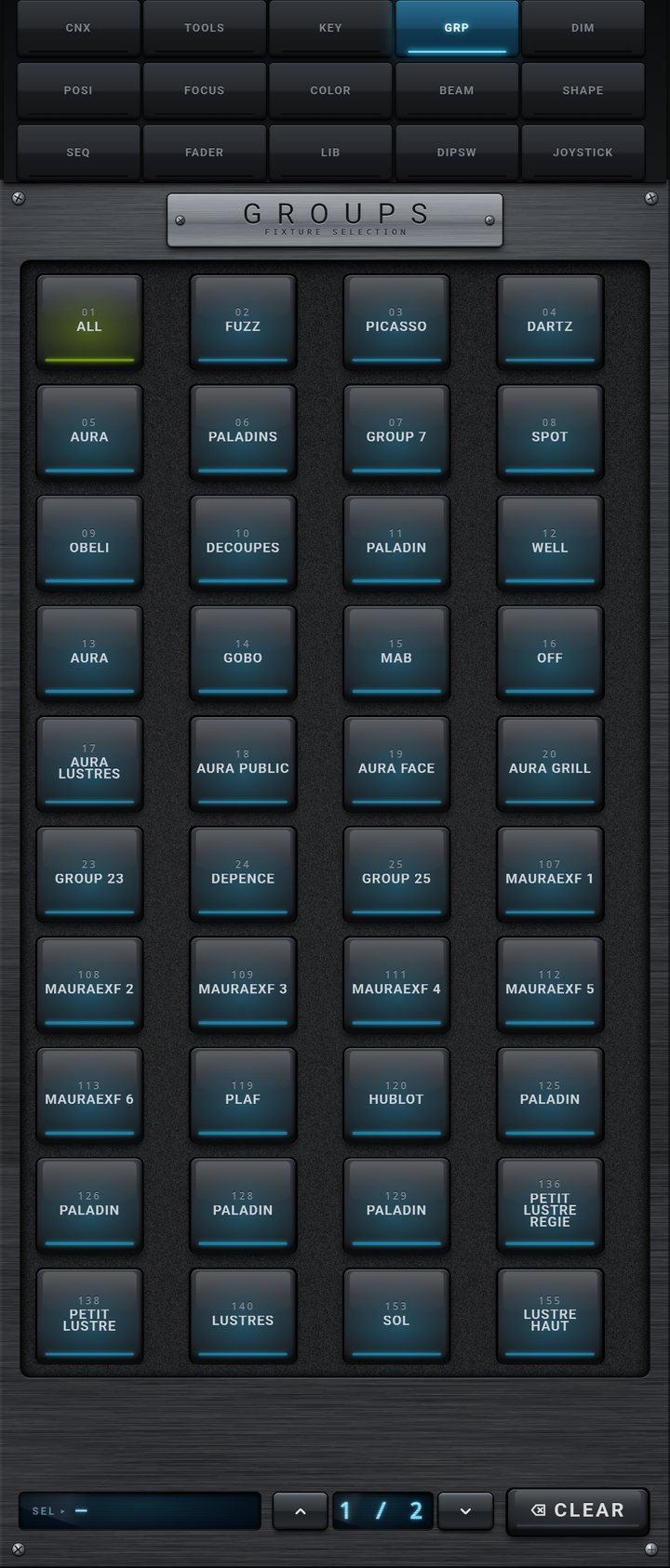
GRP tab on a phone
Phone
GRP tab on a tablet
Tablet
GRP

Group Selection

Every pad carries the number and the name of a group of the console, and takes the color of the group's appearance. Touch a pad to send Group N; touch several pads and the console adds them to its selection. The SEL display recalls the groups touched and their count.

  • Names and appearance colors read from the console
  • Multiple selection, lit pads, SEL counter
  • CLEAR sends Clear: the selection is emptied, the programmer is kept
  • Pages of 32 pads on a tablet in landscape, up to 500 groups
DIM tab on a phone
Phone
DIM tab on a tablet
Tablet
DIM

Intensity

A large dual-concentric encoder: the center knob works in 2 % steps, the outer ring in 0.5 % steps. The INTENSITY display shows the value, a bar graph and the last mode used; the LED ring follows the value. Command sent: Attribute "dimmer" At value.

  • Direct levels: 0, 25, 33, 50, 65, 75, 85, FULL - the current level stays lit
  • PRESET view: Dimmer pool (pool 1) of the console
  • UP, DOWN, PREV, SET, NEXT, SOLO, HIGHL next to the encoder
  • The key grid stays usable while the preset view is open
POSI tab on a phone
Phone
POSI tab on a tablet
Tablet
POSI

Position - Pan / Tilt

Two dual-concentric encoders, PAN and TILT, send relative moves: each step adds or removes 1 (COARSE) or 0.1 (FINE) from the current position of the fixtures, so you always start from where the beam is. The XY PAD view does the same with one finger: horizontal travel drives Pan, vertical travel drives Tilt, about 3 pixels per degree.

  • Three views: ROTARY, XY PAD, PRESET (Position pool 2)
  • Direct keys: PAN -45 / 0 / +45 and TILT -45 / 0 / +45
  • RESET centers Pan and Tilt, INVERT flips their sign, FLIP sends Flip
  • Display with two scales: Pan +/-180 degrees, Tilt +/-90 degrees
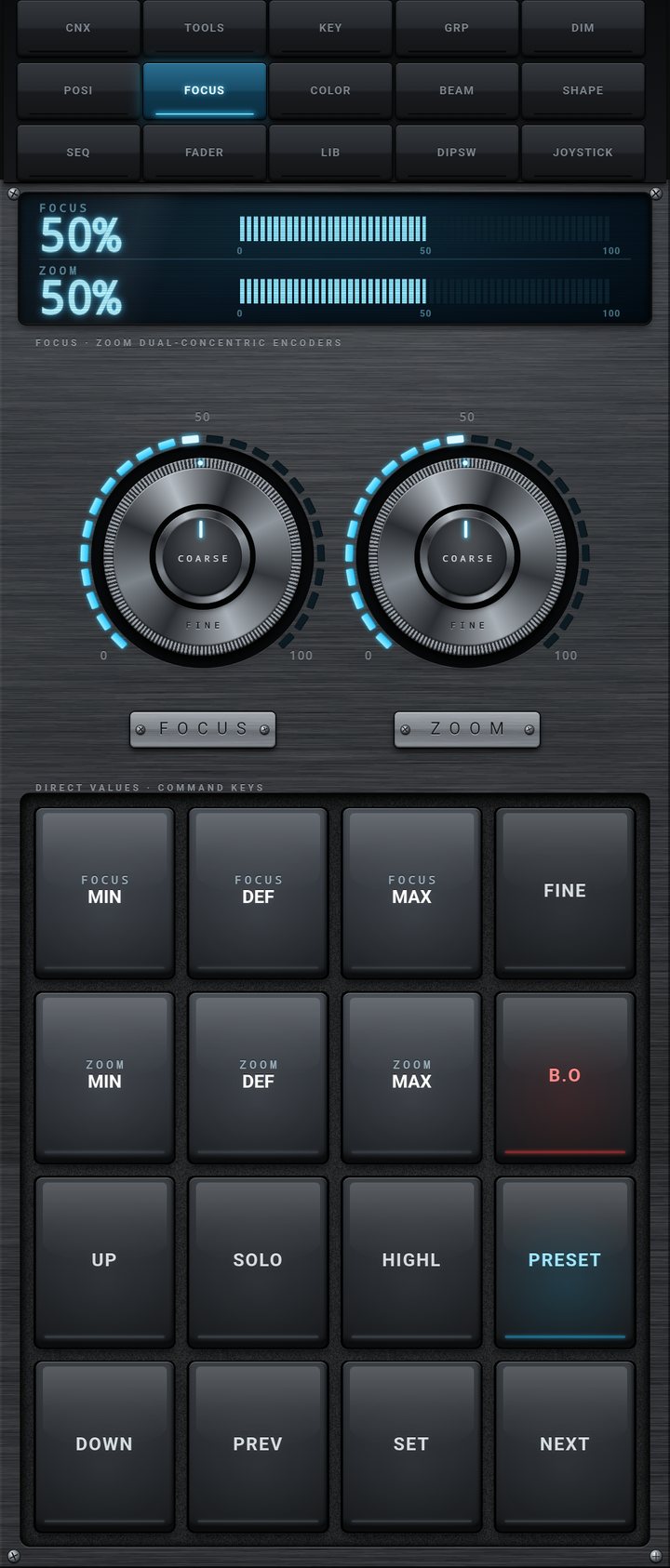
FOCUS tab on a phone
Phone
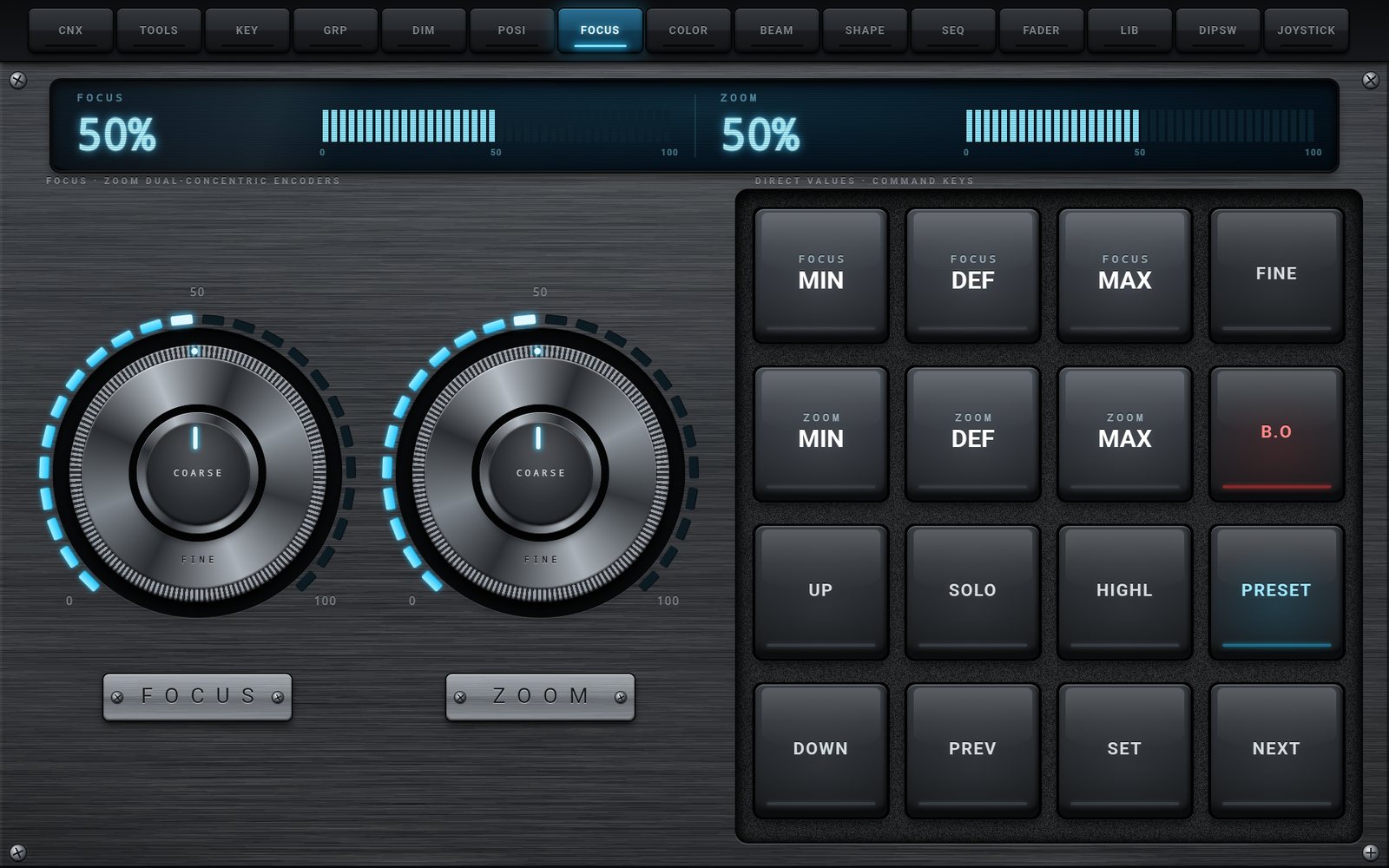
FOCUS tab on a tablet
Tablet
FOCUS

Focus & Zoom

Two dual-concentric encoders: FOCUS for sharpness and ZOOM for the beam angle, from 0 to 100 %, each with its own bar graph. Touch the center for COARSE (2 %) or the ring for FINE (0.5 %); when the FINE key is lit, the center knob works in FINE too.

  • FOCUS MIN / DEF / MAX and ZOOM MIN / DEF / MAX (0, 50, 100)
  • PRESET view: Focus pool (pool 6)
  • B.O, SOLO, HIGHL to check the result on one fixture
  • UP, DOWN, PREV, SET, NEXT to walk through the selection
COLOR tab on a phone
Phone
COLOR tab on a tablet
Tablet
COLOR

Color - Picker, RGBW and Color Temperature

COLOR PICK: a color wheel (angle = hue, distance from the center = saturation) and three R, G, B faders; the display shows the three percentages and a swatch of the result. ROTARY: seven knobs, RED, GREEN, BLUE, WHITE, CTO, CTC and CTB, with a COARSE / FINE key. PRESET: the Color pool of the console, with its real names.

  • Direct colors: WHITE, RED, GREEN, BLUE, CYAN, YELLOW, MAGENTA, NO COLOR
  • Drives the RGB mixing attributes ColorRGB_R/G/B, white and CTO / CTC / CTB
  • PRESET view: Color pool (pool 4), for color wheels and CMY fixtures too
  • Color-coded key bars: you read the grid at a glance in the dark
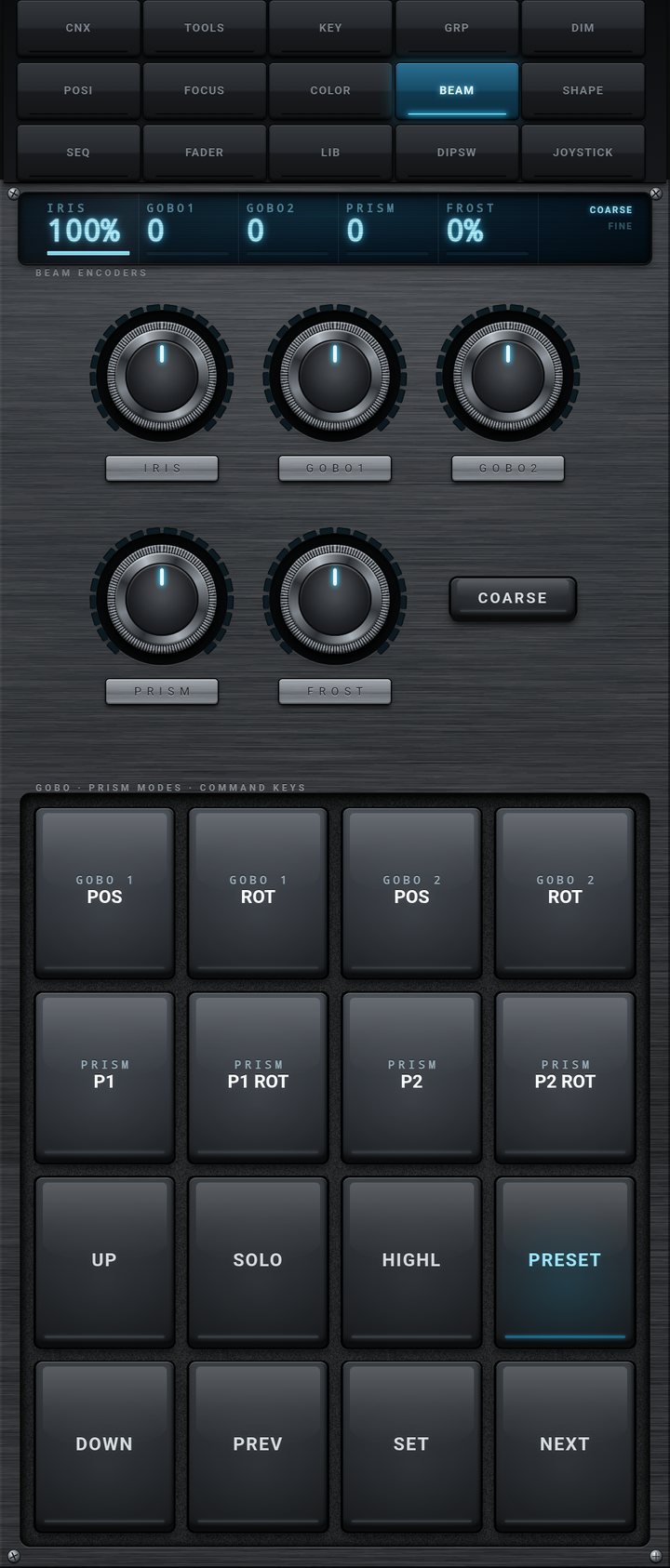
BEAM tab on a phone
Phone
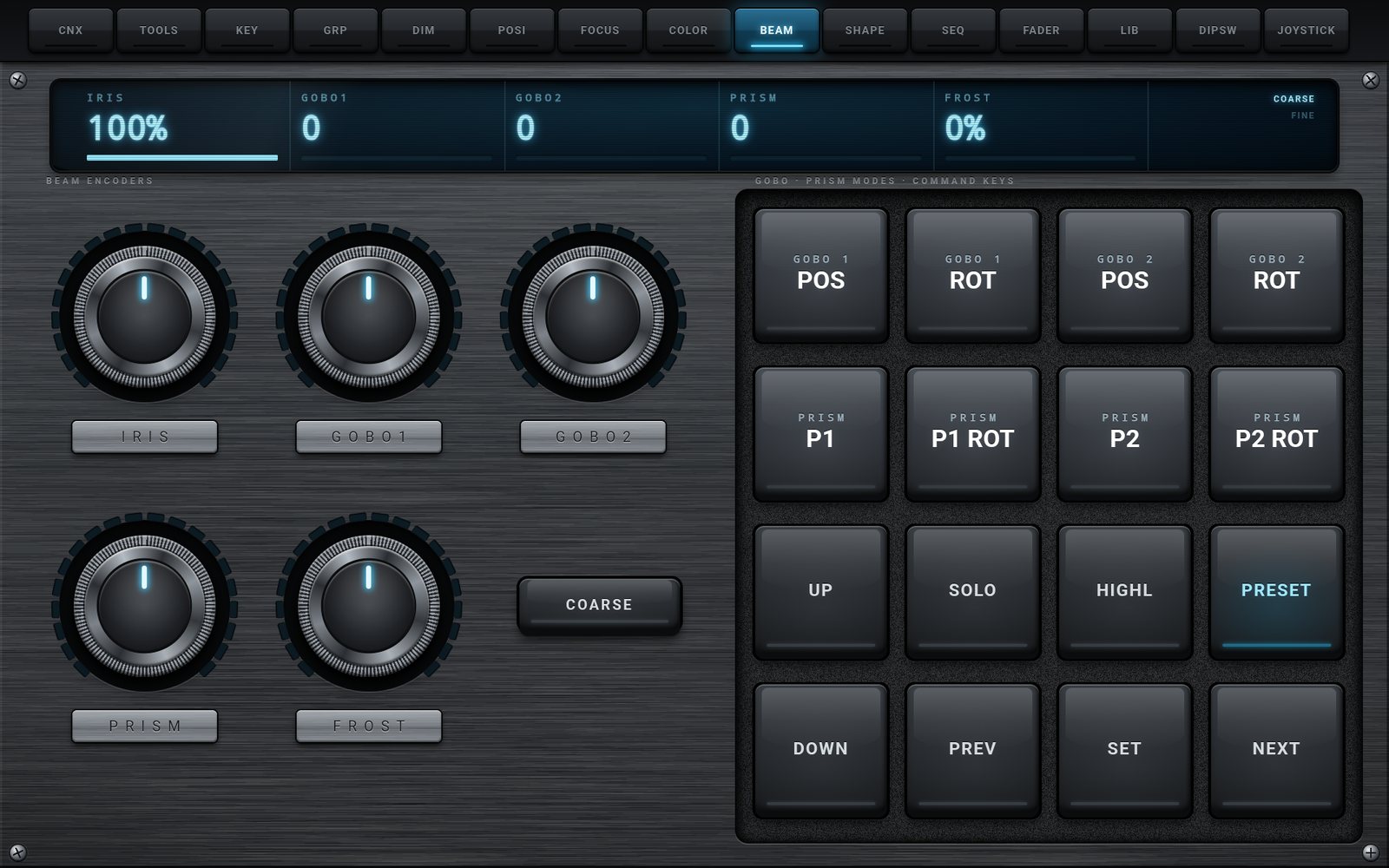
BEAM tab on a tablet
Tablet
BEAM

Beam - Iris, Gobos, Prism, Frost

Five knobs: IRIS, GOBO 1, GOBO 2, PRISM and FROST, with a COARSE / FINE key. The mode keys change what each knob drives: gobo selection, gobo index or continuous gobo rotation; prism 1, its rotation, the second effect or its rotation. The display always shows the attribute currently driven.

  • GOBO 1 POS / ROT and GOBO 2 POS / ROT: index or continuous rotation
  • PRISM P1 / P1 ROT / P2 / P2 ROT
  • PRESET view: Beam pool (pool 5)
  • UP, DOWN, PREV, SET, NEXT, SOLO, HIGHL
SHAPE tab on a phone
Phone
SHAPE tab on a tablet
Tablet
SHAPE

Shapers - Framing Blades

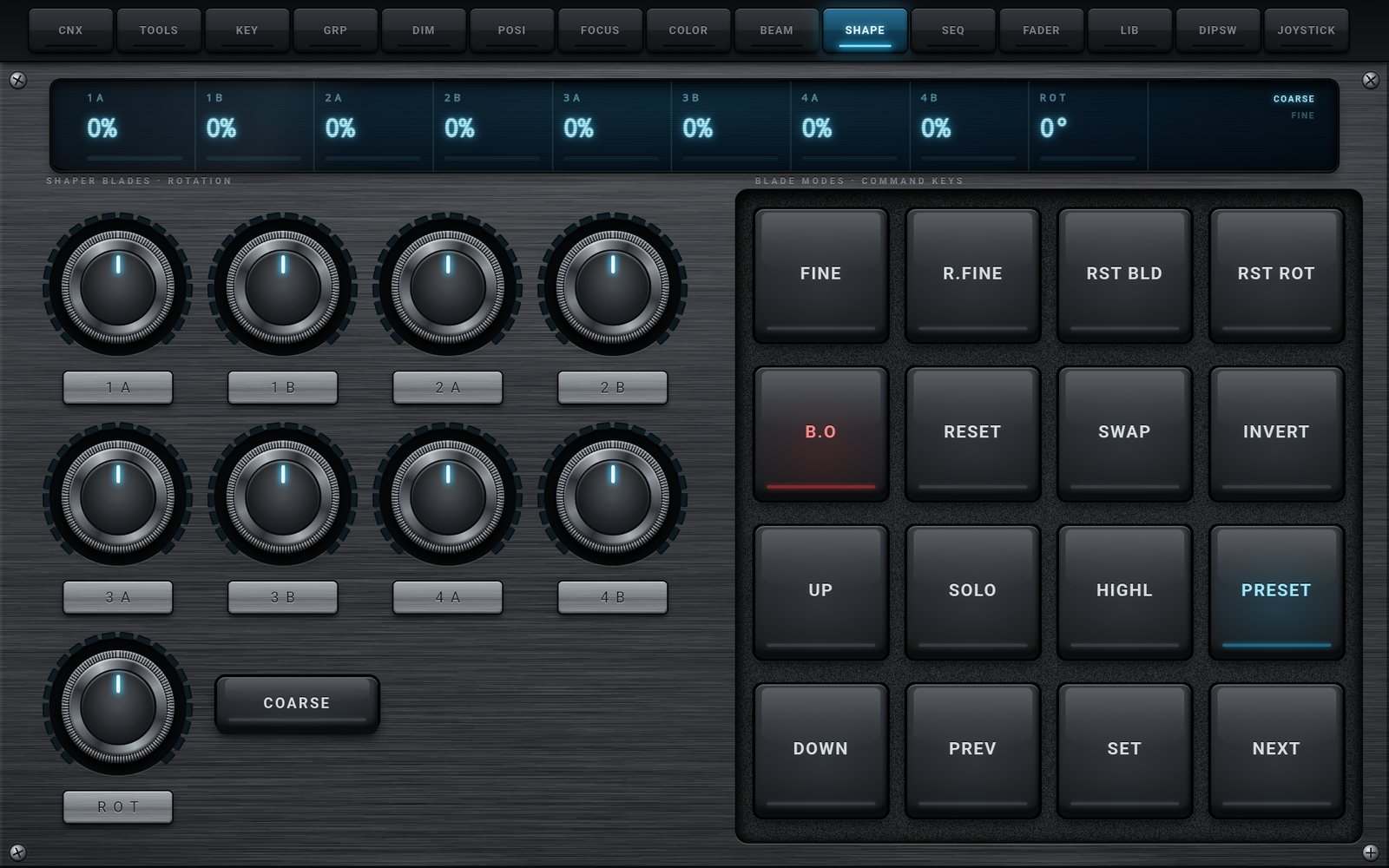
Eight knobs, 1A, 1B, 2A, 2B, 3A, 3B, 4A and 4B, for the two sides of each of the four blades (0 to 100 %), and a ROT knob for the rotation of the whole module, displayed from 0 to 360 degrees. Push the blades in first, then turn the module to line the cut up with the set, and finish in FINE.

  • FINE for the blades, R.FINE for the rotation
  • RST BLD and RST ROT send the blades or the rotation back to Default
  • RESET sets everything to 0 - SWAP and INVERT are sent to the console
  • PRESET view: Shapers pool (pool 8) - B.O, SOLO, HIGHL
SEQ tab on a phone
Phone
SEQ tab on a tablet
Tablet
SEQ

Sequences

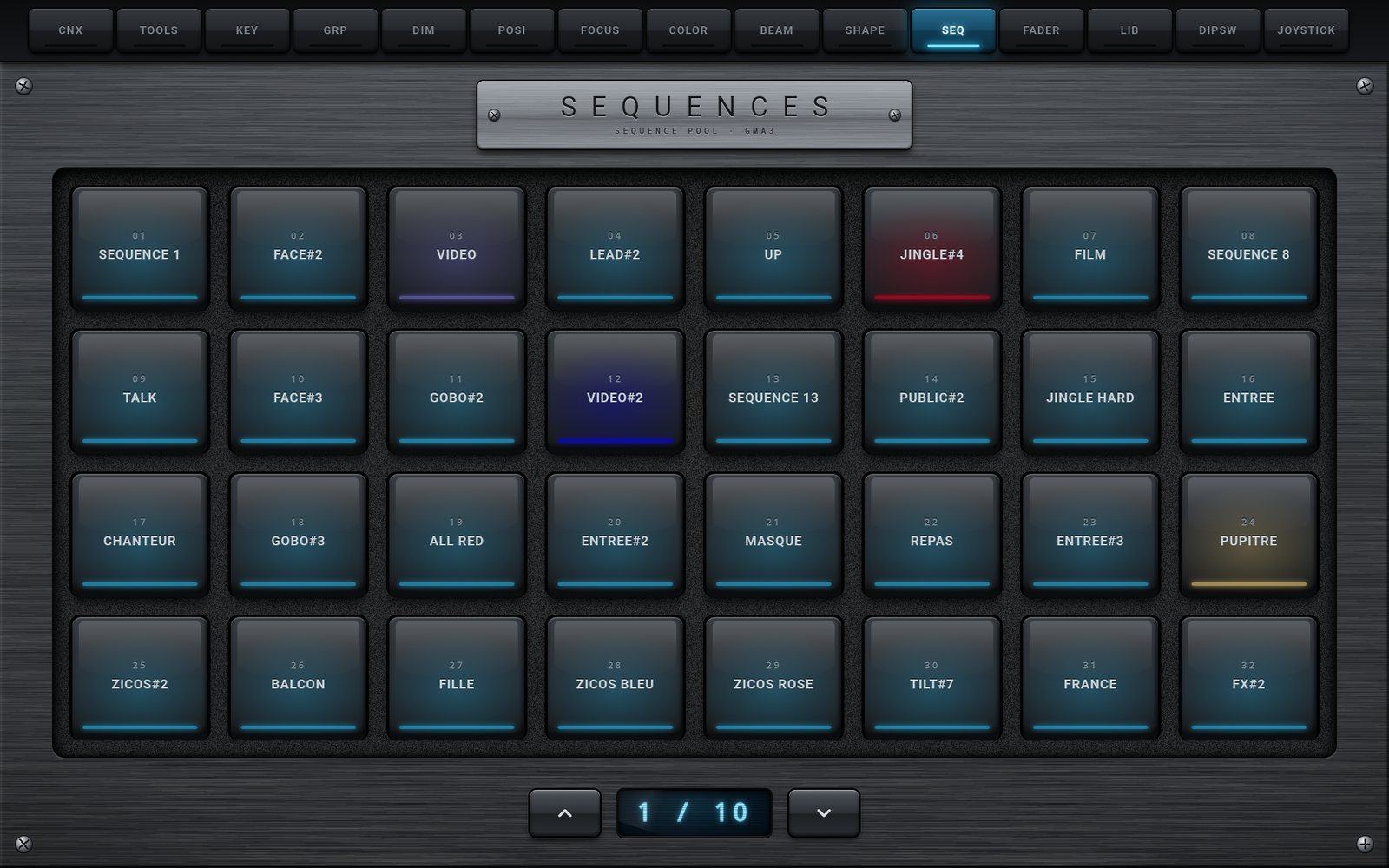
The sequence pool of the console as a wall of pads, each with its number, its name and its appearance color. First touch: Go+ Sequence N and the pad lights up. Second touch: Off Sequence N and the pad goes out. Ideal to fire looks, test cues or switch a work light from the stage.

  • Names and colors read from the console
  • Go+ / Off toggle on every pad
  • Pages of 32 pads on a tablet in landscape
  • Up to 500 sequences (SYNC SETUP, default 50)
FADER tab on a phone
Phone
FADER tab on a tablet
Tablet
FADER

Executors - Faders, Knobs and Keys

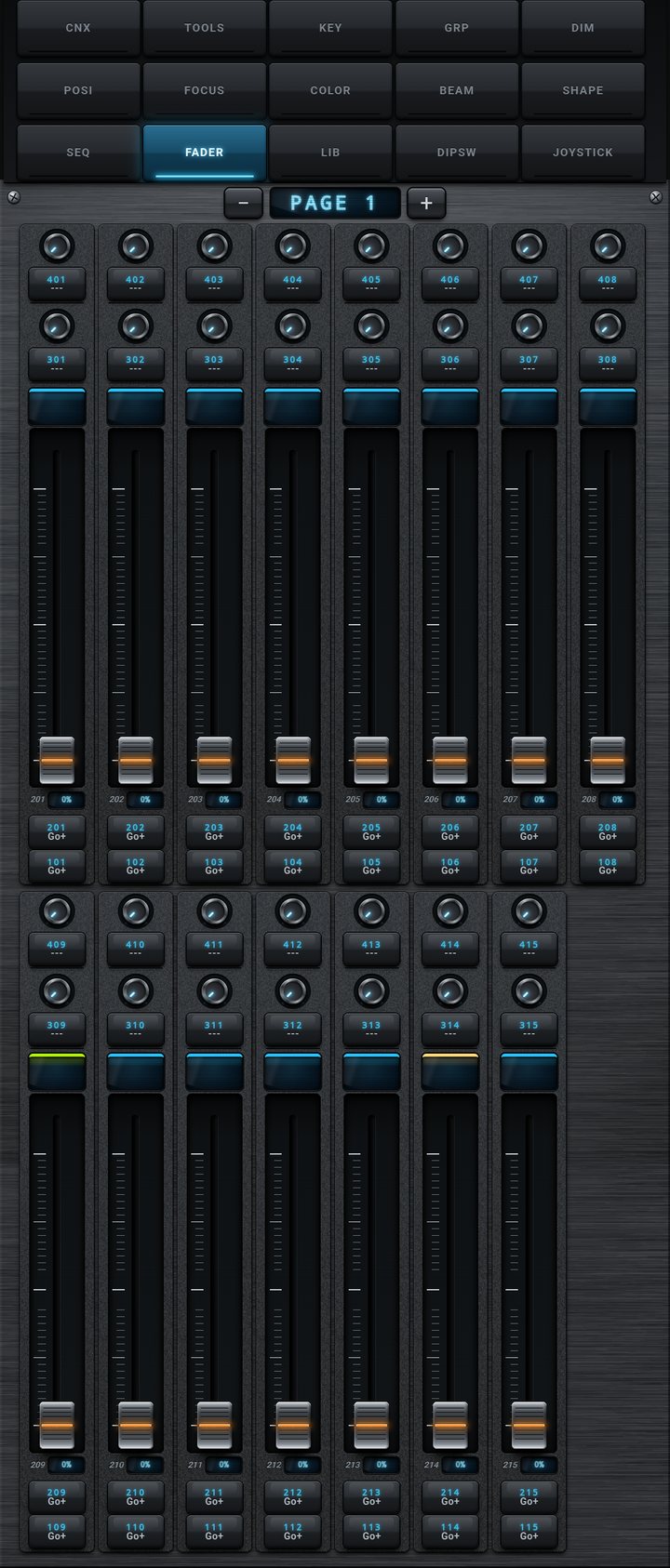
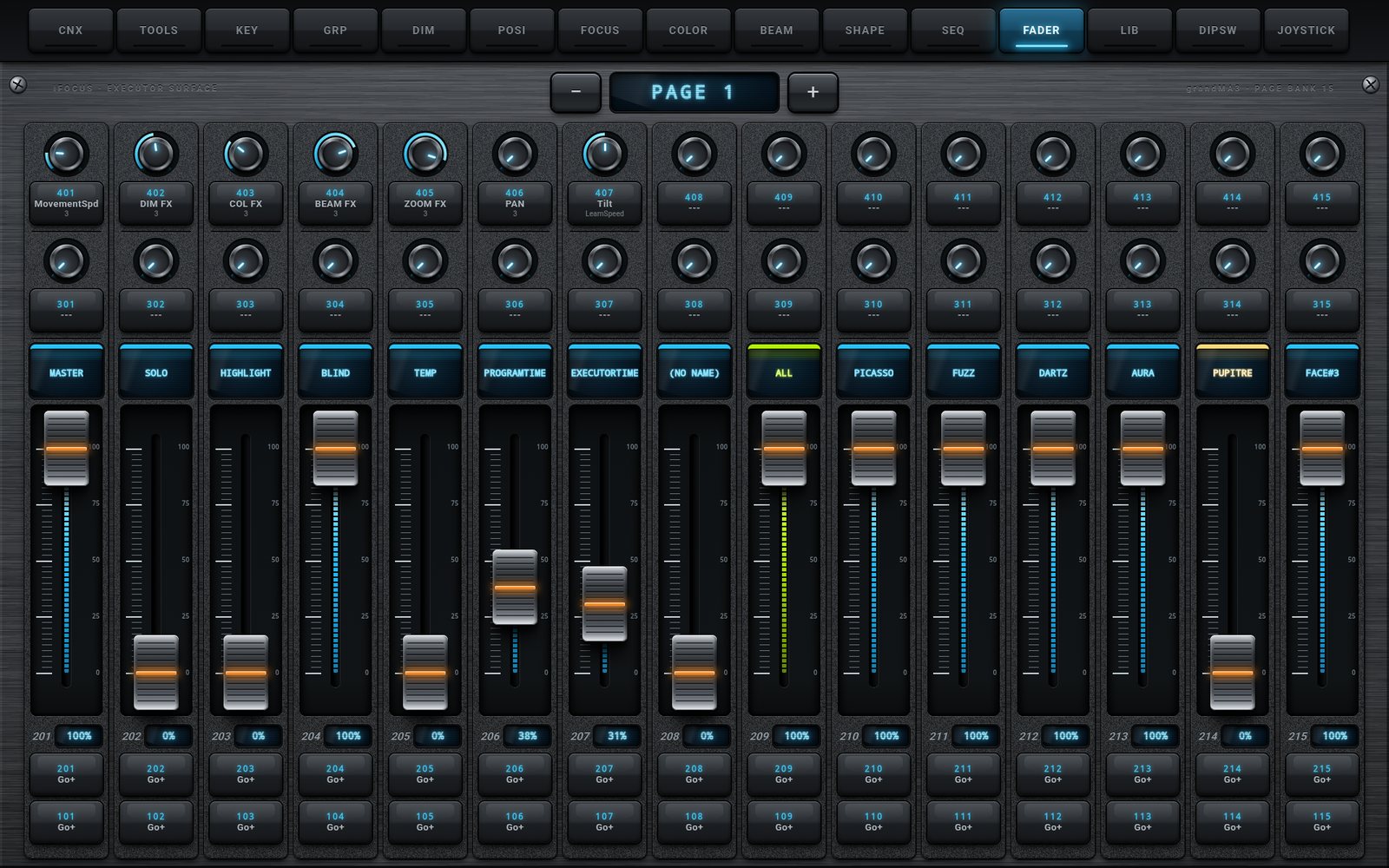
Fifteen strips per page, laid out like the console: knobs 401-415 and 301-315 with their keys, a name display with the appearance color, fader 201-215 with its value, then keys 201-215 and 101-115. The - and + keys change the executor page, from 1 to 99; on each change the app reads the names, levels, colors and key types again.

  • Faders send FaderMaster Page P Executor 2xx At value, at most 5 times per second, then the final value
  • Keys flash (100 on press, 0 on release) or toggle, according to the key type read on the console
  • Console feedback: a fader moved on the console moves in the app
  • A fader you are touching is never pulled away by the console
  • Phone in portrait: two rows of long faders, comfortable for the thumb
LIB tab on a phone
Phone
LIB tab on a tablet
Tablet
LIB

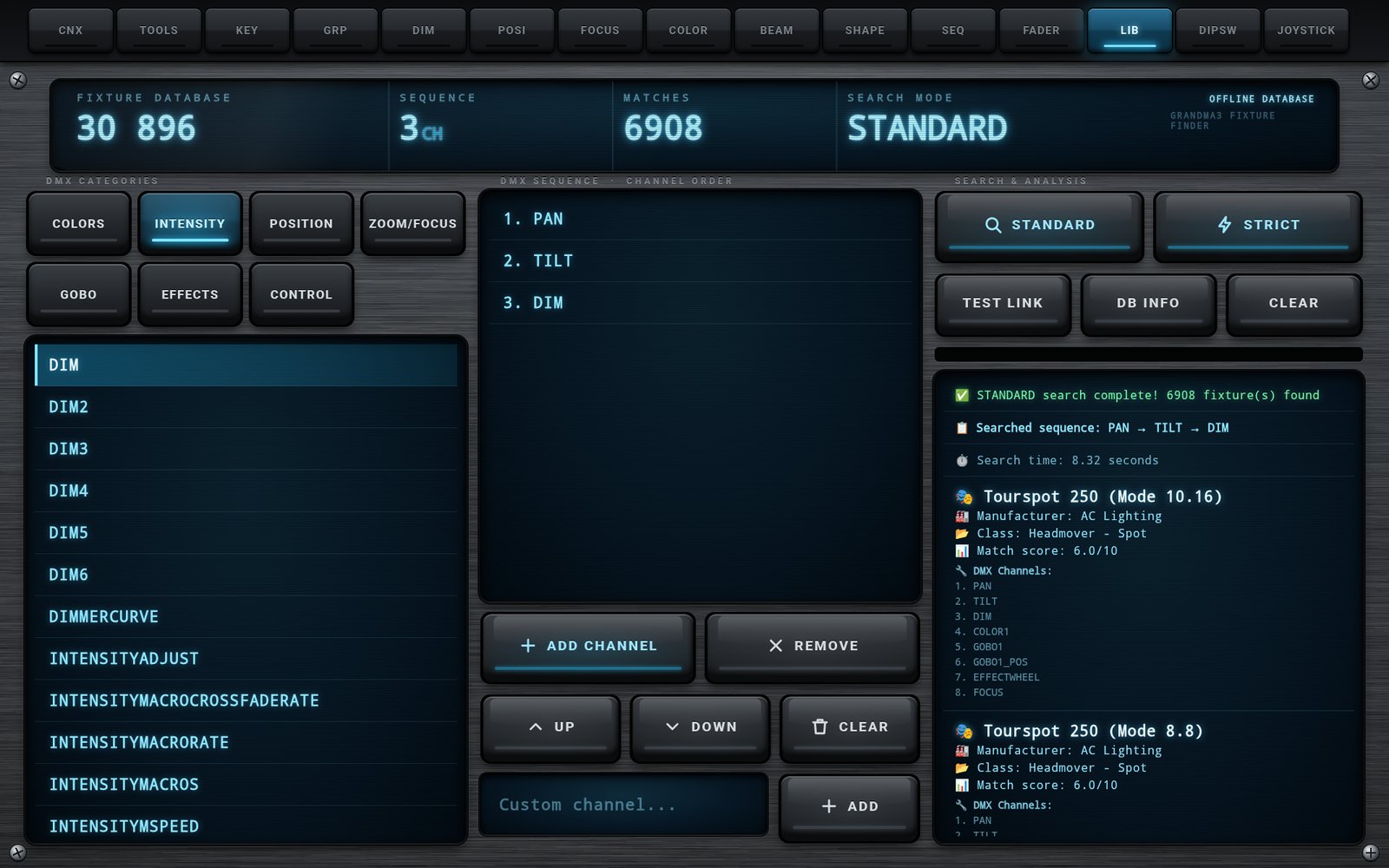
Fixture Finder

An unknown fixture and only its DMX chart? Pick the channels in the order of the chart from seven categories (COLORS, INTENSITY, POSITION, ZOOM/FOCUS, GOBO, EFFECTS, CONTROL), press STANDARD for a tolerant search or STRICT for an exact one, and LIB lists the matching fixtures and modes among the 30,896 modes of the embedded grandMA3 library. No console, no network needed.

  • Results: fixture and mode, manufacturer, class, match score out of 10, first ten channels
  • Edit the sequence: REMOVE, UP, DOWN, CLEAR, custom channel names
  • DB INFO shows the size and the date of the database, TEST LINK checks it
  • Translated in the 5 languages of the app
DIPSW tab on a phone
Phone
DIPSW tab on a tablet
Tablet
DIPSW

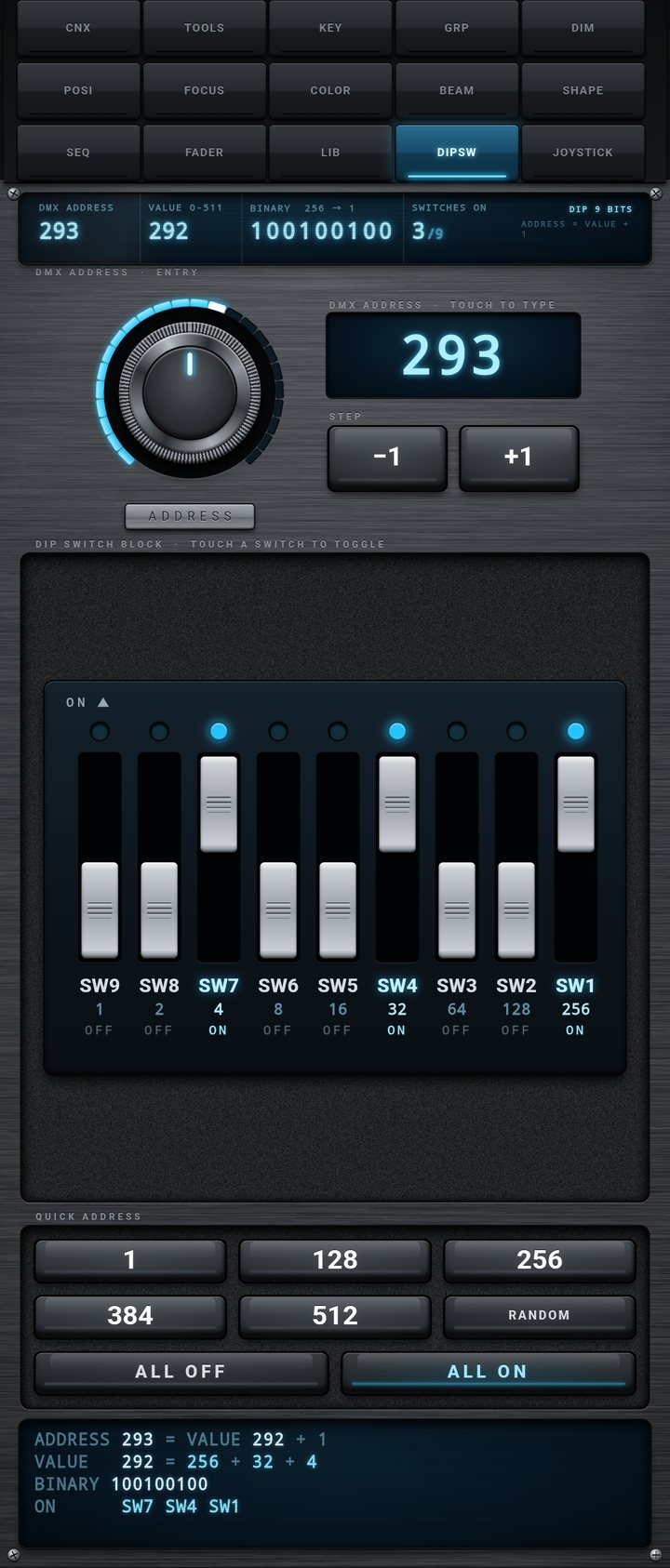
DMX Address & DIP Switches

Converts a DMX address (1 to 512) into the position of nine DIP switches, and back. Type the address, turn the ADDRESS knob, use -1 / +1, or flip the switches themselves: everything stays in sync. The lower screen details the calculation: address = value + 1, powers of two, binary writing and the list of switches set to ON.

  • QUICK ADDRESS: 1, 128, 256, 384, 512, RANDOM, ALL OFF, ALL ON
  • Example: 293 = 292 + 1 = 256 + 32 + 4, three switches ON
  • The value is engraved under every switch
  • Works offline, without a console
Physical Control

JOYSTICK - Gamepad Support

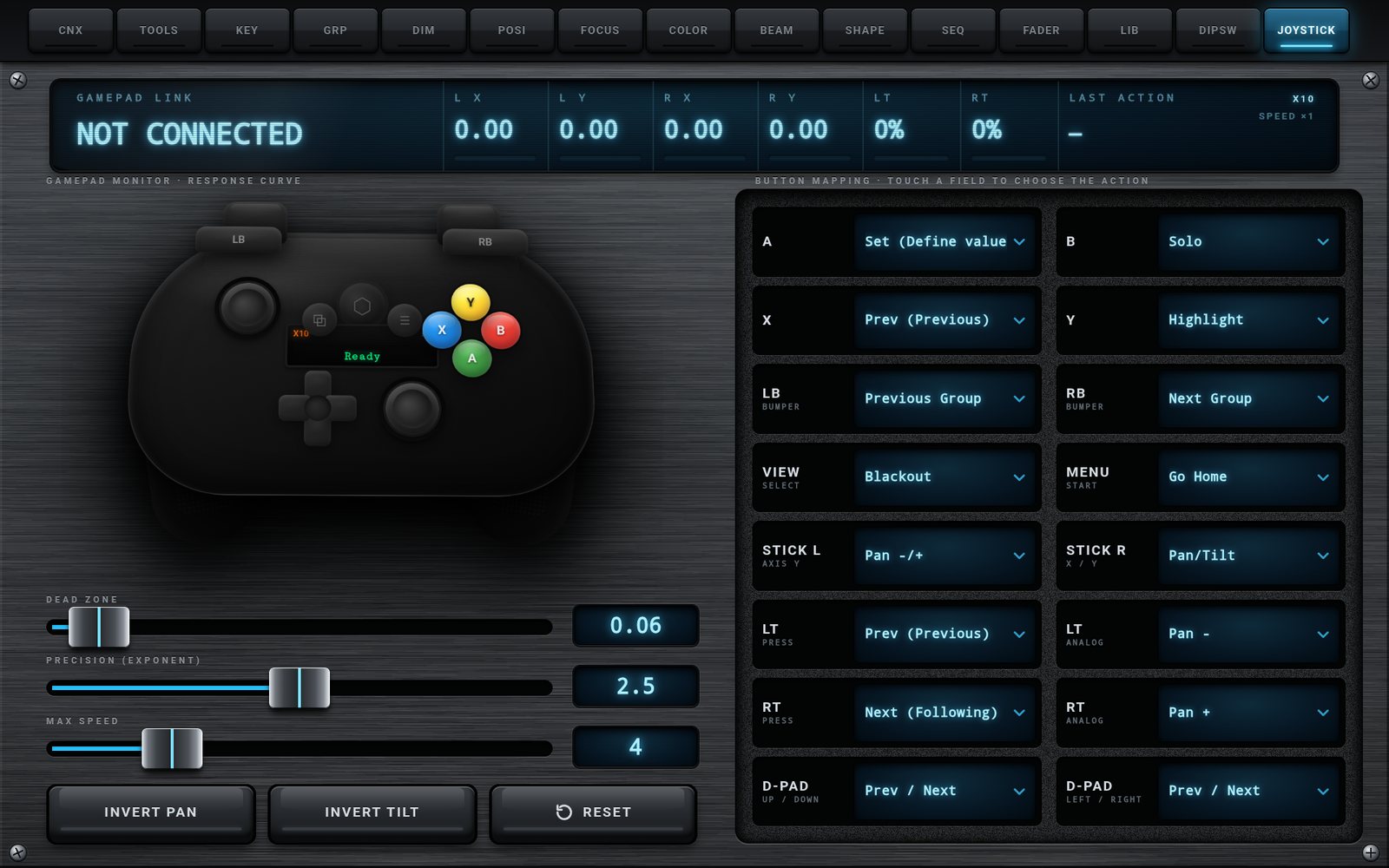
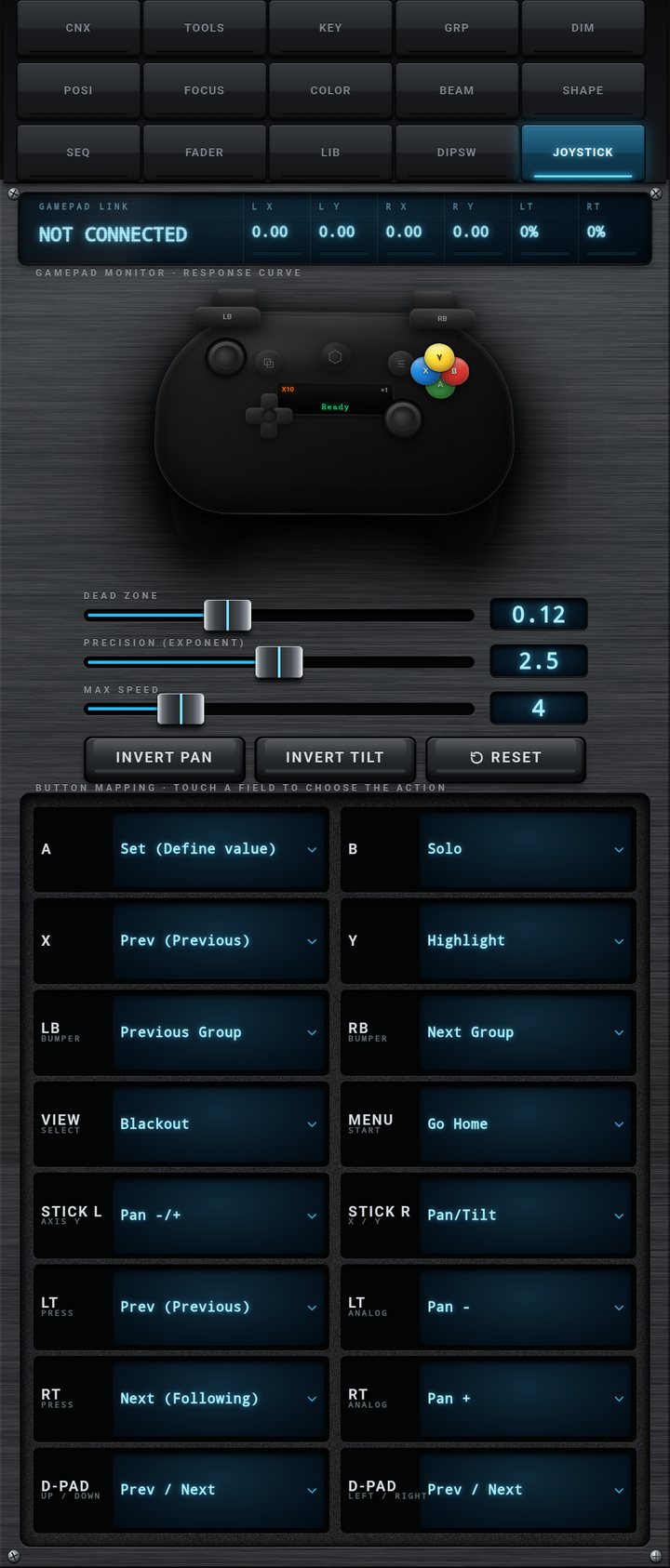
Pair a Bluetooth gamepad with your phone or tablet, or plug it in by USB: any controller recognized by Android as a gamepad works (Xbox, PlayStation, generic). Focus a moving light with a stick while looking at the stage, not at the screen.

JOYSTICK tab on a phone
Phone
JOYSTICK tab on a tablet
Tablet

Analog Sticks

Right stick on Pan/Tilt and left stick on Zoom by default. Each stick can drive Pan, Tilt, Pan/Tilt, Zoom, Focus, Zoom/Focus or Dimmer. A click on the left stick resets the Pan/Tilt total.

Triggers LT / RT and LB / RB

Two assignments per trigger: a full press (Prev / Next by default) and a progressive analog action (Pan, Tilt, Zoom, Focus or Dimmer, - or +). LB / RB step through your synchronized groups; LB + RB together always sends GoHome.

A, B, X, Y, VIEW, MENU

Set, Solo, Prev, Highlight, Blackout and Go Home by default. Each button can be reassigned: Enter (sends the KEY command line), Clear, Next, Fine (toggle, on, off), Speed /2, /4, x1, or nothing.

D-Pad

Up / down on Dimmer and left / right on Prev / Next by default; each axis can drive Prev/Next, Pan, Tilt, Zoom, Focus or Dimmer. Fine mode divides the step by 10.

Response Curve

DEAD ZONE (0.05 to 0.25) ignores a stick that does not return exactly to center, PRECISION (exponent 1.0 to 4.0) makes the start of the travel soft and accurate, MAX SPEED (1 to 15) sets the speed at full deflection. INVERT PAN and INVERT TILT.

Live Monitor

The GAMEPAD LINK display shows the name of the controller, the live values of L X, L Y, R X, R Y, LT, RT and the last action triggered. A 3D drawing of the gamepad reacts to every button. Mapping and curve are saved; RESET restores the defaults.
Console Setup

One OSC Line,
Set Once per Show File

No plugin to install, no Web Remote to enable, no user to create: iFocus Remote only needs one OSC line in the In & Out menu of the console. The setting is saved in the show file.

grandMA3 In & Out - OSC menu with the RemoteApp line
MENU - IN & OUT - OSC

The three values to type exactly

  • NameRemoteApp
  • Port8081 (UDP)
  • PrefixgrandMA3
  1. Put the phone or tablet and the console on the same network (same address range, e.g. 192.168.1.x).
  2. On the console: Menu, In & Out, OSC. Create one line named exactly RemoteApp, Mode UDP, Port 8081, Prefix grandMA3 (capitals matter, no slash).
  3. Turn on Enable Input and Enable Output, and set Receive, Send, Receive Command and Send Command to Yes. You can leave Destination IP empty: the app sets it by itself at every connection.
  4. On grandMA3 onPC, start a session: without a session onPC does not open its OSC port.
  5. In the app, CNX tab: type the IP address of the console in TARGET IP ADDRESS and press CONNECT. About eight seconds later, your groups appear in GRP with their names and colors: the link works in both directions.
Documentation

A Complete Guide,
In Five Languages

24 chapters, tab by tab and key by key: console preparation with annotated screenshots, network addresses, ports and prefix, license, every command sent by every key, the MA key table, gamepad mapping, what the app remembers, and a troubleshooting chapter. The same guide is built into the app (TOOLS, HELP). Read it before you buy.

Open the Documentation
EnglishFrançaisEspañolDeutsch中文
Seamless Integration

Built for grandMA3

iFocus Remote speaks OSC, natively supported by grandMA3 consoles and grandMA3 onPC. Every action is a command-line command sent to /grandMA3/cmd; the console answers on the same port with the content of your show. No middleware, no converter, no computer in between.

OSC over UDP 8081

One port, both directions: commands and faders out, synchronization and fader feedback in

Show Data Read by Lua

Groups, sequences, presets, executors and patch are read with Lua commands sent by the app: nothing to install on the console

Automatic Return Address

At every synchronization the app sets the Destination IP and the port of the RemoteApp line; touch LOCAL IP ADDRESS to send them again

Patch Server

Built-in HTTP server on port 8088 to share the patch as a web page, PDF, text or JSON

Technical Specifications

  • PlatformAndroid 7.0+ phones and tablets
  • ConsolesgrandMA3 consoles and onPC
  • OrientationPortrait and landscape
  • OSCUDP 8081
  • OSC address/grandMA3/cmd
  • Console OSC lineRemoteApp
  • Patch serverHTTP 8088
  • Web RemoteNot required
  • LicensePer device, works offline
  • LanguagesEN, FR, ES, DE, ZH
Get Started

Professional Tool,
Accessible Price

One-time purchase, lifetime license. No subscription, no hidden fees.

iFocus Remote

EUR 9 .99

One-time purchase - Lifetime license

  • Complete grandMA3 remote, on phone and tablet
  • 15 tabs, portrait and landscape
  • 26 attribute encoders, COARSE and FINE
  • Executors on 99 pages: 15 faders, 30 knobs, 30 keys per page
  • Groups, sequences and presets with console names and colors
  • Command keypad with MA key
  • Bluetooth / USB gamepad support
  • Patch Viewer with QR sharing
  • Fixture Finder (30,896 modes) and DIP switch calculator
  • 5 languages, complete built-in guide
  • Free updates
Buy Now

Secure payment via Lemon Squeezy. License key delivered instantly. The license is activated on one device at a time and can be released to move it to another device.